
Here are three practical, easy-to-try ways to improve web speed on a 3G phone, plus tips for testing and troubleshooting.
1) Change the APN (Access Point Name)
APN settings tell your phone how to connect to the carrier’s network. Different APN profiles can produce different performance. What to do:
– Backup your current APN before changing it.
– On Android: Settings → Network & internet → Mobile network → Access Point Names. Add or select an alternate APN profile.
– On iPhone: Settings → Cellular → Cellular Data Network (where available).
– Try alternate APNs provided by your carrier or ones shared by other users for your carrier/model. After each change, reboot the phone and run a speed test.
Notes: APN changes can affect data access and MMS; keep a copy of the working APN so you can revert if needed.
2) Try a VPN (carefully)
A VPN will not magically increase raw radio throughput, but it can sometimes improve effective browsing speed by changing routing, avoiding ISP throttling, or using compression/optimized tunnels:
– Use a VPN with nearby, well-provisioned servers and fast tunnel protocols (WireGuard or UDP-based tunnels are often faster).
– Test several providers and servers — performance varies. Free VPNs often limit speed or data; paid providers usually perform better.
– Popular options to test: NordVPN, ExpressVPN, Surfshark, Private Internet Access, Windscribe, Hotspot Shield, Speedify, TunnelBear, Turbo VPN, Droid VPN.
– Try different servers and protocols; if a VPN increases latency too much, it may harm interactive tasks despite improving throughput.
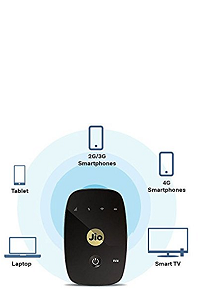
3) Use a portable 4G Wi‑Fi hotspot (e.g., JioFi) or a 4G dongle
If your phone is 3G-only but your carrier offers 4G service, a small 4G Wi‑Fi hotspot lets the hotspot handle 4G while your phone connects over Wi‑Fi:
– The hotspot can deliver much better speeds than the phone’s 3G radio.
– Confirm the hotspot supports your carrier and data plan.
– Check battery life and placement: place the hotspot where it gets best signal (near a window, not tucked in a pocket).
– Portable 4G hotspots are inexpensive in many markets; compare models and reviews before buying.
Testing and practical tips
– Measure speeds before and after each change using Speedtest.net, Fast.com, or similar tools.
– Real-world results depend on network coverage, signal strength, the phone’s radio/modem, your data plan, and local congestion.
– If speed remains poor, consider: moving to a better-coverage area, upgrading the handset to a 4G/VoLTE device, or switching carriers/plans.
– For persistent weak signal, external boosters or a different location in your home can help.
Summary
Try APN tweaks first (low cost), test a few VPN servers/providers next, and if you can, use a 4G hotspot for the biggest practical improvement on a 3G-only phone. Always test and revert if a change causes issues.